
A4DD Driver Help Center

Have you ever gotten stuck while trying to help a driver order a new service or update existing information about their A4DD membership? You want to help the driver, but really don’t have time to stop and call someone at A4DD for help. Never fear! Help is just a couple of clicks away!
The A4DD Help Center can be found under the “Driver Resources” section when the driver logs in to their account on the A4DD website.
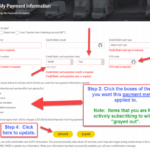
In the A4DD Help Center, they will find helpful “How To” PDFs with step-by-step instructions and screen shots for subjects such as:
- How To Sign Up for A4DD Membership
- How To Order Occupational Accident Insurance
- How To Order a Certificate (Proof) of Insurance
- How To Order Compliance, Safety, and Other Types of Training
- How To Order a Completion Certificate for an Online Course You Completed
- How To Update Your Payment Information
- How TO Update Your A4DD Member Profile
And more……….
Additionally, as a Registered Contracting Company, you can access the same information from your Company Login. Just click on Driver Resources and Click on Help Center. In addition to relevant “How Tos” for drivers, you’ll also see two helpful PDFs for you:
- How To Renew Online Advertisement
- How To Access the Find My Driver Report
Click HERE for more information.
Here's a sample of what you'll find